Compare a few hosting plans and you'll see plenty about storage, bandwidth, and price — and almost nothing about where the server physically sits. Yet for a website serving Malaysian visitors, server location has a bigger impact on loading speed than most optimizations you'll ever make afterwards.
The common assumption is that a Malaysian website needs a server in Malaysia. The reality is more useful than that: what matters is not the flag on the data center, but the milliseconds between your server and your visitors. A server in Singapore is effectively next door; a server in Dallas or Frankfurt is not — and your visitors feel the difference on every single click.
This guide explains how server location affects speed and SEO, when it matters most, what a CDN can and cannot fix, and how to test any hosting provider's latency from Malaysia before you pay for anything.
How Server Location Affects Loading Speed
Every time someone opens your website, their browser and your server exchange data over physical fiber routes. Each exchange is a round trip, and the time one round trip takes is called latency. No amount of server power removes it — it is largely a function of distance and network routing.
Latency hurts more than it first appears because a browser needs several round trips before your page even starts arriving. On a first visit to an HTTPS site, the browser typically performs:
- A DNS lookup to find your server's IP address (here's how DNS works)
- A TCP connection handshake
- A TLS (SSL) handshake to establish encryption
- The actual HTTP request for the page
| Server location | Typical round trip from Malaysia |
|---|---|
| Malaysia (local data center) | 3–15 ms |
| Singapore | 5–15 ms |
| Tokyo | 70–90 ms |
| Europe (Frankfurt / London) | 160–200 ms |
| US West Coast | 180–220 ms |
It's Milliseconds That Matter, Not Borders
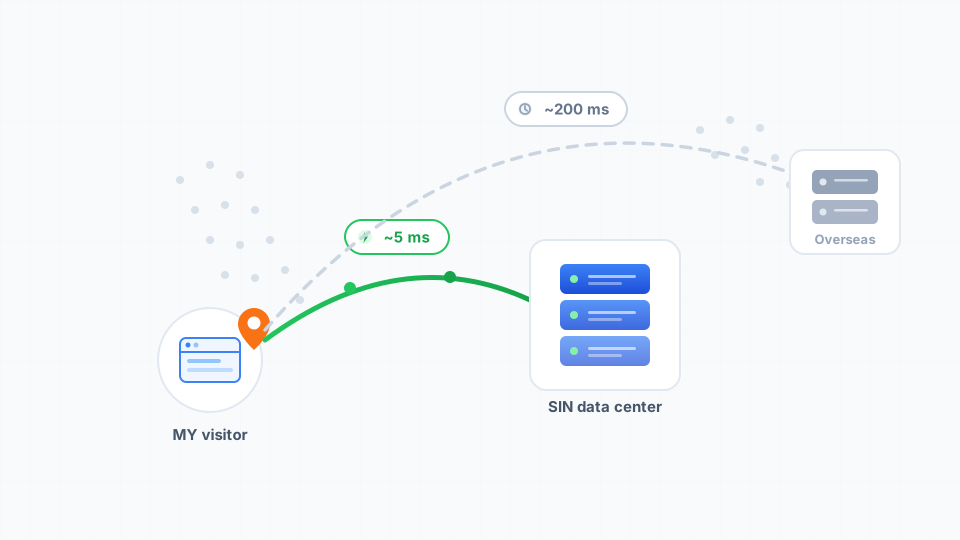
Notice that Malaysia and Singapore sit in the same row, practically speaking. Singapore is Southeast Asia's connectivity hub: the major submarine cables land there, the big internet exchanges operate there, and cloud platforms like AWS, Google Cloud, and Azure have long served Malaysian traffic from their Singapore regions. Plenty of hosting sold as "Malaysian hosting" physically runs in Singapore for exactly this reason.
From a visitor in KL, Penang, or Kuantan, a well-connected Singapore data center responds in single-digit to low-double-digit milliseconds — a difference no human can perceive. The real divide isn't "Malaysia vs everywhere else." It's in-region vs overseas.
Does Server Location Affect SEO?
This question usually mixes up two different things, so let's split them.
As a geographic ranking signal: barely. Google's own guidance on multi-regional sites notes that server location is often not a reliable signal of who a site is for, because of CDNs and regional hosting. Your domain choice (a .my or .com.my domain is a strong signal), your content, and your business details carry far more geographic weight than the server's coordinates.
Through speed: significantly. Page experience and Core Web Vitals are part of how Google evaluates pages, and server response time feeds directly into metrics like Largest Contentful Paint. A distant server raises your response time on every request, which drags those metrics down for the visitors — and the crawls — that matter to you.
So the honest answer: server location affects SEO mainly through speed, not geography. Pick a location for your visitors, and the search engines follow.
When Server Location Matters Most
Not every website feels distance equally:
- Dynamic sites feel it on every click. WooCommerce stores, membership sites, booking systems, and anything with logins or carts generate pages on demand. Every add-to-cart and checkout step pays the full round trip, so latency compounds across a session — often at the worst possible moment, payment.
- Static brochure sites feel it less — especially behind a CDN — but the first, uncached visit still pays the distance penalty, and first impressions are exactly when speed matters.
- The more your visitors interact, the more location matters. A five-page company profile tolerates distance far better than a store processing dozens of requests per order.
Can a CDN Fix a Faraway Server?
Partly — and it's important to understand which part.
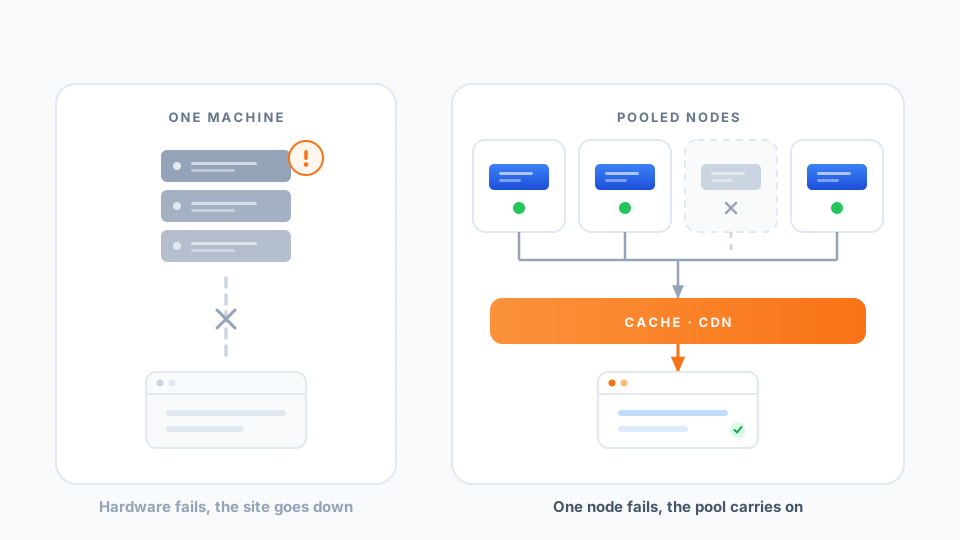
A CDN copies your static files (images, CSS, JavaScript) to edge servers around the world, so those load quickly regardless of where your origin server sits. What a CDN generally does not fix is the dynamic HTML itself: cart contents, logged-in pages, checkout steps, and search results are generated by your origin server, and those requests still travel the full distance.
Think of it this way: a CDN is a superb complement to a nearby server, and a partial patch for a distant one. If your site is slow and you're not sure why, our help guide on diagnosing a slow-loading website walks through how to tell latency problems from everything else.
How to Test a Host's Latency From Malaysia
You don't have to take any provider's word for it — including ours. Before buying:
- Speed-test the provider's own website. Tools like WebPageTest let you test from a Singapore location — the closest proxy for Malaysian visitors. Look at the Time to First Byte (TTFB): consistently under ~200 ms from Singapore suggests an in-region server; 500 ms+ suggests an overseas one.
- Ask where the data center is. A provider confident in its infrastructure will name the location. Vague answers are an answer too.
- Ping a hosted site. If you know a website hosted with the provider,
ping yourdomain.comfrom a Malaysian connection shows the round-trip time directly. Double-check the result if the site uses a CDN — you may be pinging the edge, not the server. - Use the money-back window. Upload a test page and measure it from your own connection before the refund period ends.
Choosing a Host as a Malaysian Business: Beyond Location
Server proximity is necessary, but it isn't sufficient. The rest of the "local" advantage comes from the business side:
- Support in your time zone — a checkout problem during Malaysian business hours needs an answer during Malaysian business hours
- MYR billing — pricing in ringgit means no exchange-rate surprises on renewal
- Local payment methods — FPX online banking and local e-wallets, not just international credit cards
- Familiarity with the local market — from .com.my registrations to advice that fits Malaysian SMEs
Cynet has provided web hosting in Malaysia since 2006, serving 3,000+ Malaysian teams from a Singapore data center milliseconds from local visitors, with NVMe SSD storage and LiteSpeed servers on every plan. You can compare hosting plans to see which fits your site.
The Bottom Line
- Server location sets a speed floor no optimization can dig below — three to four round trips happen before your page even starts loading.
- For Malaysian audiences, "in-region" is what counts: Malaysia and Singapore are both milliseconds away, while Europe and the US are not.
- Location affects SEO through speed (Core Web Vitals), not as a meaningful geographic signal — your domain and content handle geography.
- Dynamic sites — especially online stores — feel distance the most, and a CDN only shields the static parts.
- Test before you buy: TTFB from Singapore, a simple ping, and a direct question about the data center reveal everything you need.